

How do I reset the lock on a safe box for parcels?
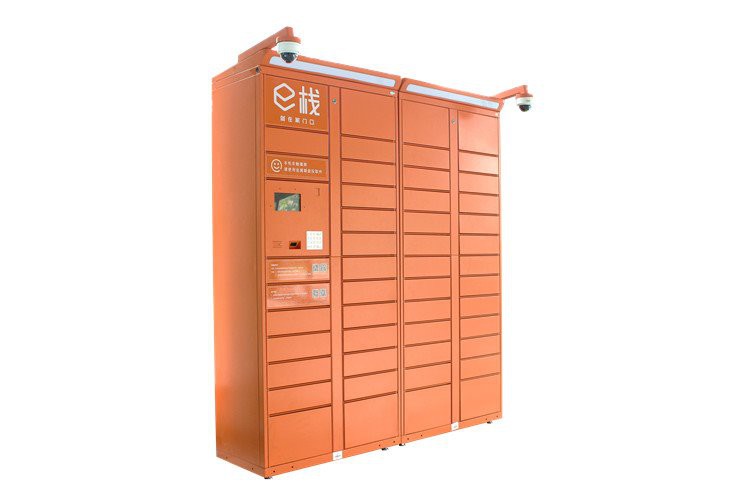
As a supplier of Safe Box for Parcels, I often receive inquiries from customers about how to reset the lock on these convenient storage units. Resetting the lock on a safe box for parcels is a crucial skill that ensures the security and functionality of the locker. In this blog, I will guide you through the process step by step, so you can manage your parcel storage effectively.
Why Reset the Lock?
There are several reasons why you might need to reset the lock on your Safe Box for Parcels. Firstly, if you have forgotten the existing combination or access code, a reset is necessary to regain access. Secondly, when you are changing the user of the locker, such as moving to a new tenant or employee, resetting the lock provides a fresh start for the new user. Additionally, for security reasons, regular lock resets can prevent unauthorized access and keep your parcels safe.
Types of Locks on Safe Boxes for Parcels
Before we dive into the reset process, it's important to understand the different types of locks commonly used in Safe Box for Parcels.
1. Mechanical Combination Locks
These locks require you to turn the dial to a specific combination of numbers to unlock. They are simple and reliable, but can be tricky to reset if you don't know the procedure.
2. Electronic Keypad Locks
Electronic keypad locks allow you to enter a numeric code to access the locker. They are more convenient and can be easily programmed with new codes.
3. Biometric Locks
Biometric locks use fingerprint or facial recognition technology to grant access. While they offer high - level security, they also require proper maintenance and occasional resetting of the stored biometric data.
Resetting a Mechanical Combination Lock
If your Safe Box for Parcels is equipped with a mechanical combination lock, follow these steps to reset it:
Step 1: Open the Locker
First, you need to open the locker using the existing combination. If you have forgotten the combination, you may need to contact the manufacturer or a professional locksmith for assistance.
Step 2: Locate the Reset Button
Inside the locker, there is usually a small reset button. This button is often recessed and may require a small tool, such as a paperclip, to press.
Step 3: Set the New Combination
Press and hold the reset button. While holding the button, turn the dial to set your new combination. Make sure to choose a combination that is easy for you to remember but difficult for others to guess.
Step 4: Release the Reset Button
Once you have set the new combination, release the reset button. Test the new combination by closing the locker and then opening it using the newly set numbers.
Resetting an Electronic Keypad Lock
Electronic keypad locks are more common in modern Safe Box for Parcels due to their convenience. Here's how you can reset them:
Step 1: Enter the Master Code
Most electronic keypad locks have a master code that allows you to perform administrative functions, including resetting the lock. Enter the master code on the keypad.
Step 2: Select the Reset Option
After entering the master code, you will usually see a menu on the keypad display. Use the arrow keys to navigate to the "Reset" or "Change Code" option.
Step 3: Enter the New Code
Once you have selected the reset option, you will be prompted to enter the new code. Enter the new code twice to confirm. Make sure to follow the code length and complexity requirements specified by the lock manufacturer.
Step 4: Test the New Code
Close the locker and try to open it using the new code. If the locker opens successfully, the reset process is complete.
Resetting a Biometric Lock
Biometric locks offer a high level of security, but they also need occasional resetting. Here's how:
Step 1: Access the Admin Mode
Similar to electronic keypad locks, biometric locks have an admin mode that can be accessed using a master code or a specific procedure. Enter the master code or follow the manufacturer's instructions to enter the admin mode.
Step 2: Delete Existing Biometric Data
In the admin mode, you can find an option to delete all existing biometric data, such as fingerprints or facial templates. Select this option to clear the stored data.
Step 3: Enroll New Biometric Data
After deleting the existing data, you can start enrolling new biometric data. Follow the on - screen instructions to place your finger on the fingerprint sensor or position your face in front of the camera for facial recognition.
Step 4: Test the New Biometric Access
Close the locker and try to open it using the newly enrolled biometric data. If the locker opens, the reset process is successful.
Troubleshooting
Sometimes, you may encounter issues during the reset process. Here are some common problems and their solutions:

Problem 1: Can't Open the Locker
If you can't open the locker using the existing combination or code, double - check the code or try to recall the combination. If you still can't open it, contact the manufacturer or a professional locksmith.
Problem 2: Error Messages on the Keypad
If you see error messages on the electronic keypad, refer to the lock's user manual. The manual will usually provide a list of error codes and their meanings, along with instructions on how to resolve them.
Problem 3: Biometric Recognition Failure
If the biometric lock fails to recognize your fingerprint or face, make sure your finger is clean and dry or your face is well - lit. You may also need to re - enroll your biometric data.
Conclusion
Resetting the lock on a Safe Box for Parcels is a straightforward process once you understand the type of lock you have and follow the correct steps. Whether you have a mechanical combination lock, an electronic keypad lock, or a biometric lock, regular lock resets are essential for maintaining the security of your parcels.
If you are in the market for a high - quality Safe Box for Parcels, we offer a wide range of options, including Safe Box for Parcels, Home Delivery Locker, and Customer Pick Up Lockers. Our products are designed with the latest technology and security features to ensure the safety of your parcels.
If you have any questions about our products or need assistance with lock resetting, feel free to contact us for a procurement discussion. We are here to help you find the best solution for your parcel storage needs.
References
- Manufacturer's user manuals for Safe Box for Parcels
- Industry standards and best practices for lock security